What is Google Ads? Complete Guide to Online Advertising in 2026
What is Google Ads ? In the world of digital marketing, getting instant traffic and reaching your target audience can be challenging. This is where Google Ads comes in. Google Ads is a paid online advertising platform developed by Google that allows businesses to display ads on Google search results, partner websites, YouTube, and mobile apps. Unlike organic methods like SEO, Google Ads provides instant visibility to your business by targeting potential customers who are searching for your products or services.
In this guide, we will cover everything you need to know about Google Ads, including how it works, types of campaigns, benefits, and tips for beginners.
What is Google Ads
Google Ads is based on a Pay-Per-Click (PPC) model, meaning you only pay when someone clicks on your ad. It allows businesses to appear on top of search results with a “Sponsored” label, ensuring immediate visibility to people actively searching for relevant products or services.
For example, if a user searches for “digital marketing agency near me”, the businesses running Google Ads targeting these keywords will appear at the top of the search results.
How Google Ads Works
Google Ads works by combining keywords, bidding, and ad quality. Here’s a step-by-step breakdown:
1 . Keyword Selection:
Choose keywords relevant to your business. Example: “SEO services” or “digital marketing agency.”
2 . Create Ads:
Write compelling ad copy with headlines and descriptions.
3 . Set Budget & Bids:
Decide how much you’re willing to pay per click.
4 . Ad Placement:
Google displays your ads on search results, partner websites, YouTube, or apps.
5 . Pay Only When Clicked:
You only pay when someone clicks your ad (PPC model).
Google uses a combination of Ad Rank and Quality Score to determine which ads appear first. Ads with high relevance, click-through rates (CTR), and landing page quality perform better and cost less per click.
Types of Google Ads Campaigns
How it offers several campaign types, each serving a unique purpose.
1 . Search Ads
- Text-based ads that appear on Google search results.
- Best for reaching customers who are actively searching for your product or service.
2 . Display Ads
- Banner ads shown on websites across Google’s Display Network.
- Great for brand awareness and remarketing to past visitors.
3. Video Ads
- Ads shown on YouTube before, during, or after videos.
- Ideal for storytelling and engaging audiences visually.
4. Shopping Ads
- Product-based ads with images, price, and store name.
- Perfect for e-commerce businesses to showcase products directly in search results.
5. App Campaigns
- Promote your mobile applications on Google Search, Play Store, YouTube, and apps.
- Helps increase app installs and engagement.
Benefits of Google Ads
Google Ads offers several advantages over traditional advertising and even organic marketing methods:
- Instant Traffic: Get immediate visibility and visitors to your website.
- Targeted Audience: Reach users based on keywords, location, devices, and demographics.
- Budget Control: Decide how much to spend daily or monthly.
- Measurable Results: Track performance with tools like Google Analytics and Google Search Console.
- Better Conversion Rates: Targeted ads attract users who are more likely to convert into customers.
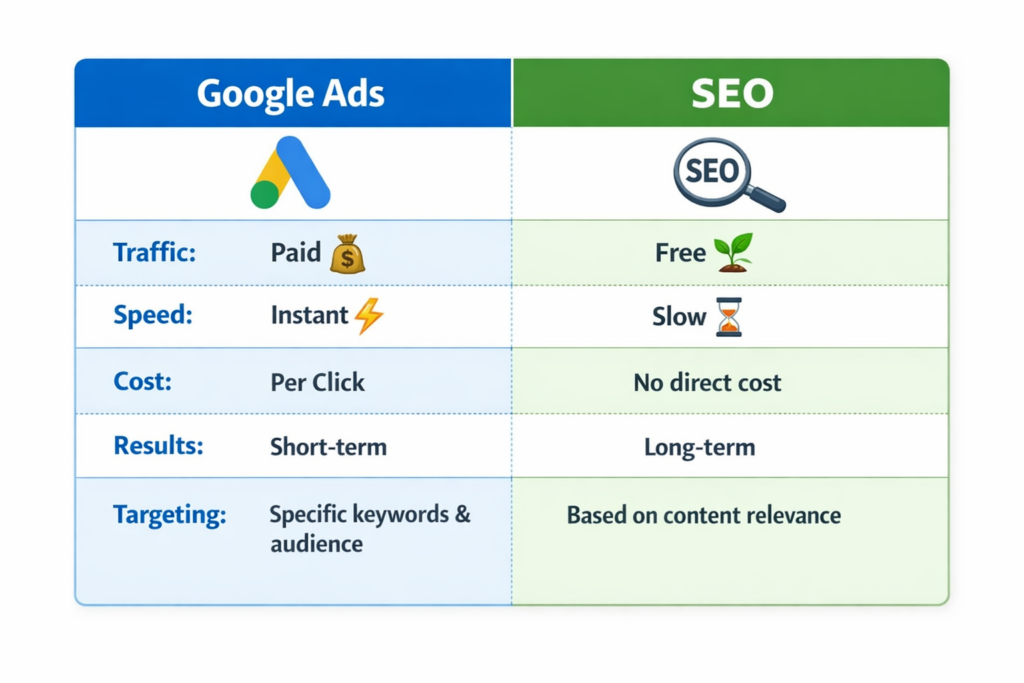
Google Ads vs SEO
How to Create a Successful Google Ads Campaign
1. Define Goals
Determine whether you want sales, leads, website traffic, or brand awareness.
2. Research Keywords
Use tools like Google Keyword Planner to find relevant keywords with high intent and low competition.
3. Write Compelling Ads
Include strong headlines, clear descriptions, and call-to-action (CTA) like “Get Started” or “Contact Us Today.”
4.Optimize Landing Pages
Ensure your website or landing page is fast, mobile-friendly, and relevant to your ad.
5. Track Performance
Use analytics tools to monitor clicks, CTR, conversion rates, and adjust campaigns accordingly.
Common Mistakes to Avoid
- Ignoring keyword research
- Writing weak ad copy
- Not targeting the right audience
- Sending traffic to irrelevant landing pages
- Not testing ads regularly
Avoiding these mistakes ensures better ROI and more efficient ad spend.
Tips for Beginners
- Start with a small budget to test campaigns
- Focus on high-intent keywords
- Use ad extensions like site links, call buttons, and location
- Continuously analyze performance and optimize
Conclusion
Google Ads is a powerful tool for businesses of all sizes. It helps drive instant traffic, generate leads, and increase brand visibility. By understanding how it works, selecting the right campaign types, and optimizing your ads, you can achieve measurable results and grow your business online.
Whether combined with SEO or used as a standalone strategy, Google Ads remains one of the most effective ways to reach your target audience in 2026.